

Does ecoATM Take Apple Watches? Here’s What You Need to Know
If you’re wondering, “Does ecoATM take Apple Watches?” the answer is: Yes, but it’s a bit more complicated than just dropping it off at the kiosk. Let me walk you through the whole process.
When I first tried to trade in my Apple Watch at ecoATM, I expected a quick and easy process. I thought I could simply walk up to the kiosk, pop my Apple Watch in, and walk away with some cash. Well, it didn’t go exactly as planned. I quickly realized that ecoATM doesn’t always accept Apple Watches, or at least not in the way I thought.
Does ecoATM Take Apple Watches?
Yes, ecoATM does accept Apple Watches, but the method and conditions depend on the model of your watch and whether you use the mail-in program or a physical kiosk. While ecoATM kiosks are primarily designed for smartphones and tablets, there are still ways to trade in your Apple Watch.
How Does ecoATM Take Apple Watches?
EcoATM’s approach to accepting Apple Watches differs depending on the method you choose.
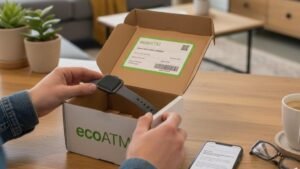
- Mail-In Program: The primary method for selling your Apple Watch to ecoATM is through their mail-in program. You can get a quote online using their pricing tool, then send your device in for free. Once ecoATM receives your Apple Watch, they’ll inspect it and send payment via PayPal or Venmo within 1–3 business days.
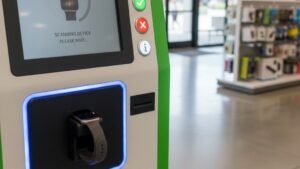
- Kiosk Drop-off: Most ecoATM kiosks are designed to accept smartphones, tablets, and MP3 players, but some newer kiosks may allow you to recycle or get a quote for smartwatches. However, not all kiosks can process smartwatches on the spot. If you want to check if your local kiosk accepts Apple Watches, you can use the ecoATM location finder on their website.
How to Sell Your Apple Watch to ecoATM
If you’re ready to sell your Apple Watch, here’s how you can go about it:
Step 1: Check Your Apple Watch’s Model and Condition
Before proceeding, make sure your Apple Watch is compatible with ecoATM and in a good enough condition for trade-in. EcoATM accepts various Apple Watch models, including the Apple Watch Ultra, Series 10, Series 9, and older versions like the Series 5 and Series 6. The condition of your device matters too. EcoATM accepts watches with cosmetic damage or minor functional issues, but severely damaged devices may only be eligible for eco-friendly recycling.
Step 2: Decide Whether to Use the Mail-In Program or Kiosk
Once you know your Apple Watch’s model and condition, you can decide whether to use the mail-in program or the kiosk drop-off method. If you want a quicker payout, the mail-in program might be your best bet. If you prefer to trade in at a kiosk, remember that not all kiosks accept Apple Watches, so you’ll need to check the kiosk’s capabilities.
Step 3: Prepare Your Apple Watch for Trade-In

Before sending your Apple Watch to ecoATM, make sure you prepare it by following these steps:
- Unpair the watch from your iPhone: This ensures that the device is no longer linked to your personal account.
- Disable “Find My” (Activation Lock): This is crucial to ensure that the device can be processed properly.
- Factory Reset the device: Wipe all personal data from your watch by doing a factory reset.
- Charge it to at least 30%: If you’re using the kiosk, having a charged device will ensure that the kiosk can test the device’s functionality.
Step 4: Get Your Payment
Once your device is ready and sent to ecoATM (or tested at a kiosk), you’ll receive your payment. For the mail-in program, payments are usually made via PayPal or Venmo within 1–3 business days after ecoATM receives your watch and completes the inspection. If you use the kiosk, you’ll receive cash instantly (if the device is accepted at that location).
Accepted Apple Watch Models & Conditions
EcoATM accepts a wide range of Apple Watch models, including the latest versions like the Apple Watch Ultra, Series 10, and Series 9, as well as older versions such as the Series 5 and Series 6. However, ecoATM’s ability to process Apple Watches depends on the model and the method you choose (mail-in or kiosk).
What Condition Does My Apple Watch Need to Be In?
EcoATM will accept Apple Watches in various conditions—even if they have cosmetic damage or minor functional issues. However, severely broken devices, such as ones with cracked screens or non-functional parts, may only be eligible for eco-friendly recycling instead of a cash payout.
Do I Need to Include the Original Box or Accessories?
No, you don’t need to include the original box, charging cable, or watch bands when trading in your Apple Watch at ecoATM. As long as the watch is in acceptable condition, you can receive a payout without these extras.
Preparation Checklist Before Selling Your Apple Watch
To make sure your trade-in goes smoothly, follow this checklist before sending your Apple Watch to ecoATM:
- Unpair the Watch from Your iPhone: Disconnect the device from your phone to prevent any syncing issues.
- Disable “Find My” and Activation Lock: This ensures the watch can be processed and resold if necessary.
- Factory Reset the Device: Wipe all data from the Apple Watch to protect your privacy.
- Charge Your Apple Watch to 30%: This is especially important if you plan to drop it off at a kiosk. A charged watch ensures that it can be tested properly.
Frequently Asked Questions (FAQ)
1. How much can I get for my Apple Watch at ecoATM?
The value of your Apple Watch at ecoATM will depend on the model and condition of the device. Generally, the trade-in value can range from $50 to $250 or more, depending on the version and functionality. Keep in mind that older models or damaged devices will likely fetch lower payouts.
2. Can I get instant payment for my Apple Watch at ecoATM?
EcoATM does offer instant payment for devices that are accepted at their kiosk locations, but since not all kiosks accept Apple Watches, you may have to use the mail-in program for a guaranteed trade-in. Mail-in program payments are processed within 1–3 business days after the device inspection.
3. Does ecoATM accept all Apple Watch models?
EcoATM accepts a wide range of Apple Watch models, including newer models like the Apple Watch Ultra, Series 9, and Series 10, as well as older models like the Series 5 and Series 6. EcoATM kiosks may not always support Apple Watches, so it’s best to use the mail-in program for a more reliable option.
4. What happens if my Apple Watch is too damaged to sell?
If your Apple Watch is too damaged to sell, ecoATM may still accept it for recycling through its eco-friendly program. In this case, you won’t receive a cash payout, but your device will be safely recycled to reduce environmental impact.
Explaining how does ecoATM take Apple Watches
Does ecoATM take Apple Watches? The process is a bit more complicated than simply dropping off your device at a kiosk. Depending on your model and condition, you can either trade in your Apple Watch via ecoATM’s mail-in program or drop it off at a kiosk (if the kiosk supports it).
Make sure to follow the preparation checklist to ensure a smooth trade-in experience. And if ecoATM isn’t the best option, there are always third-party services or direct selling platforms that might offer better payouts for your device. Happy trading!


